Introducing a website for assessment
- kkm9357
- 2020년 6월 2일
- 5분 분량
최종 수정일: 2020년 6월 24일
Today, I'll introduce a useful website for assessment and other additional functions.
The website is called "TopgrAde"

First of all I'll introduce how to use this website

Make an account and login.

2. Click the "Create Quiz" button.

3. Name your quiz title and choose the category.

4. Press the "Add Question" button.

5. Choose the form of question and write the question (ex. multiple choice/ Who is the author of "Pride and Prejudice"?)


6. Fill in the answers and incorrect answers and set up the time. (ex. correct answer: Jane Austen/ incorrect answer: Charlotte Bronte etc.)

If you want to try the quiz, you can press the preview button and solve the question.


If you want to see the result of the students click the "result" button


In the result section, you can see detailed information of the result the student made
(such as date, name, whether it's correct or not)
"TopgrAde" is a website/app in which you can make quizzes in your own class and assess the quiz score of the students. The main purpose of this website is to make your own educating course and share it with the students. There are 3 types of forms you can make which is a quiz, survey, and flashcards. After you finish making your material, you can choose whether to share or just keep your own. There are several characteristics of this website. First, the options are very diverse.

First of all, you can choose from 3 options: quiz, survey, and flashcards. If you click quiz you can choose the form of the quiz


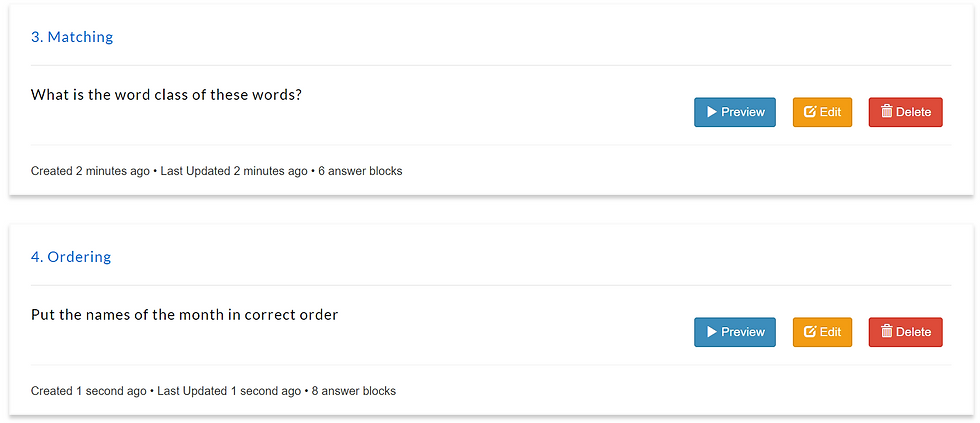
There are 6 selections: multiple choice, fill blanks, matching, ordering, true or false, and speech recognition (for the premium version). You can choose whatever form you prefer.
Second, you can use a planner for your studying and teaching plan.

You can add any plans you made in this calendar, for example, midterm exam, mini quiz, and so on.
The advantages of this website are closely related to the features I wrote above. First, you can create a diverse form of questions for any type of student. Teachers can assess students in many ways. Only using one method such as "short answer" or "choose one right answer" might not be an objective way to evaluate the students' ability. Diversity of option supplements this problem. Also, students can feel less bored while doing the activity because of different styles of questions. Second, the resulting system is detailed. The result record system contains much information such as date, time and it shows in a neat way so you can see it at a glance. Especially, the overview graph is very effective to look the level of student and assess him or her. However, disadvantages also exist. The biggest weakness of this website is that real-time interaction is impossible. Giving feedback is one of the most important step of assessment however, it's impossible in this website. So the teacher need to use other program to give feedback or do face to face feedback. Also, the students who want to join the activity should make an account and enter one's personal information. This can cause discomfort to people who don't want their personal information to be licked out somewhere else. I was also concerned about writing my information (my name, e-mail address, and phone number).
Reflection By this assignment, I could search for lots of websites and applications that are creative and useful. While searching and testing them, I tried to think in both teacher and student view, (especially students' view) And I felt that some of the websites were very difficult to use for people who are not used to a particular system. That's also the reason I chose this website: It was simply designed and easy to use for teachers and students. Also, I thought this website can be used not only by students' assessment tools but also by students' self-evaluation tools. I would use this website as my study tool from now on. And someday I wish I would use it as a teaching and assessment tool for my students.
Profile of Learners
age: between 14~16 (middle school age in Korea)
number of learners: 15
proficiency level
conduct level test (placement assessment) with "TopgrAde" website → content: assessing Critical thinking skill, Vocabulary, Syntax
the qualified level is B1 intermediate (CEFR) which means "the students can communicate in situations, and use simple language to communicate feelings, opinions, plans, and experiences." But the additional characteristic of my students is that they still have some trouble in writing with proper grammatical rules.

Course Plan
Activity 1. Solve the quiz made by "TopgrAde" website → content of the quiz are grammatical rules, vocabulary and simple discussion

→ grammatical rules (correct word class)

→ vocabulary (using various words to express negative situation)

→ Grammatical rules (matching the right word class)

→ Vocabulary (basic words in English)
Evaluation (Hubbard's criteria)
Technical preview : It runs smoothly in both computer & smartphone

Operation - time limit: O (Students have to enter the answer until the time goes/ the basic setting of time is 1 minute and teachers can change from 1 second to 20 minutes) - control: freedom ↓ (Students can only answer to the question and don't have much freedom moving the program as they want) - user input: type a word, click the right answer, type one or more sentence - feedback: only shows the right or wrong answer, no specific feedback
Teacher fit : This software fits the course I planned. My course is made to enhance language skills only. This website well fits with my lesson plan because it provides diverse options in making questions so that I can make various questions with one or two themes. This helps more objective assessment. Also, the survey creating option is diverse so, I can design several types of surveys to have a discussion. However, the biggest weak point of this website is the feedback system. Students can only check whether they are right or wrong and can't get specific feedback or comments for development.
Learner fit : The language level is adequate for the students I teach. As the students have the same characteristic: lack of grammatical skills. They can practice basic grammar rules and apply them to new sentences. The software is also proper medium. It is designed intuitively. For instance, if the student wants to access the quiz, they just have to press the "preview" button. If the students have basic competence in using deva ices such as computers and smartphones, it wouldn't be that hard.
Implementation : It can be easily integrated into the course because it is not hard to use (skills pyramid: specific technical competence for the software). Also, it functions as a quiz making+achievement assessment tool, so it's easy to apply in any kind of lesson plan.
Appropriateness : If this program was real human teacher, I would have not let him/her teach students alone. The reason is the lack of a feedback system. I am using this website as a tool and can give feedback face-to-face or by using other technical programs. However, using only this website makes it hard to form up an effective teaching environment. There must be a supporting tool.
Reflection : This was one of the most difficult assignment to me, because I had to understand what Hubbard's criteria are, make my own lesson plan, and finally apply that criteria to the lesson plan. However, by doing this activity, I could assess my own review that I wrote before. Personally, after using these criteria for this website, I thought this tool wasn't a good teaching software to recommend. But, I think knowing that my result was not a perfect one is also a good opportunity to develop and solve my problems. It was a really meaningful assignment.



It was interesting to see how to have actually created a quiz by using an assessment tool as your lesson plan. I also had a similar assessment website as yours and I made my lesson plan to be creating a quiz of their own (my students). Due to the different lesson plans, how you and I interpreted the website by using Hubbard's criteria differ from each other. Your analysis focuses more on student's language learning while mine is more focused on content learning. It was really interesting!! I could enlarge my view on analyzing an assessment website because of you. Also, you have set your student's level of proficiency to be Intermediate (B1), but I'm afraid your task is quite…
Nice work Kyungmin! I liked how you pointed out that providing feedback is another important aspect of assessing. I also agree that self-evaluation, and teacher given feedback is essential for students' development. About the website, I liked how it had a calendar where both teachers and students can keep track of their class schedules. I would like to point out some of the minor parts in your post where you could add on. First, (this is really really minor) you gave examples questions on English literature, and I thought it would make your post more relevant if you changed the picture in which you captured biology as a category of the quiz. Second, while I was reading your post, I…